Chaos engineering for Kubernetes operators: testing what actually matters
Most chaos engineering tools do one thing well: kill a pod, wait for Kubernetes to restart it, declare victory. And that’s a valid test. But it tests the Deployment controller. It tests kubelet. It tests the scheduler. It does not test your operator.
Operators manage entire resource graphs. Deployments, Services, ConfigMaps, Secrets, CRDs, RBAC bindings, webhooks, finalizers. When something breaks in that graph, the real question is not “does the pod come back?” but “does the operator detect the drift and put everything back the way it should be?”
I couldn’t find a tool that answered that question, so I built one. operator-chaos is a chaos engineering framework specifically designed to test operator reconciliation logic. It ships 20 fault types across four categories, uses declarative knowledge models to understand what your operator manages, and produces structured verdicts: Resilient, Degraded, Failed, or Inconclusive.
This is Part 1 of a two-part series. This post covers the framework, its design, and how to get started. Part 2 will go deeper into the SDK integration, advanced fault composition, and real-world results from testing RHOAI’s 16 component controllers.
What makes operator reconciliation different
Traditional chaos tools and operator-chaos ask fundamentally different questions.
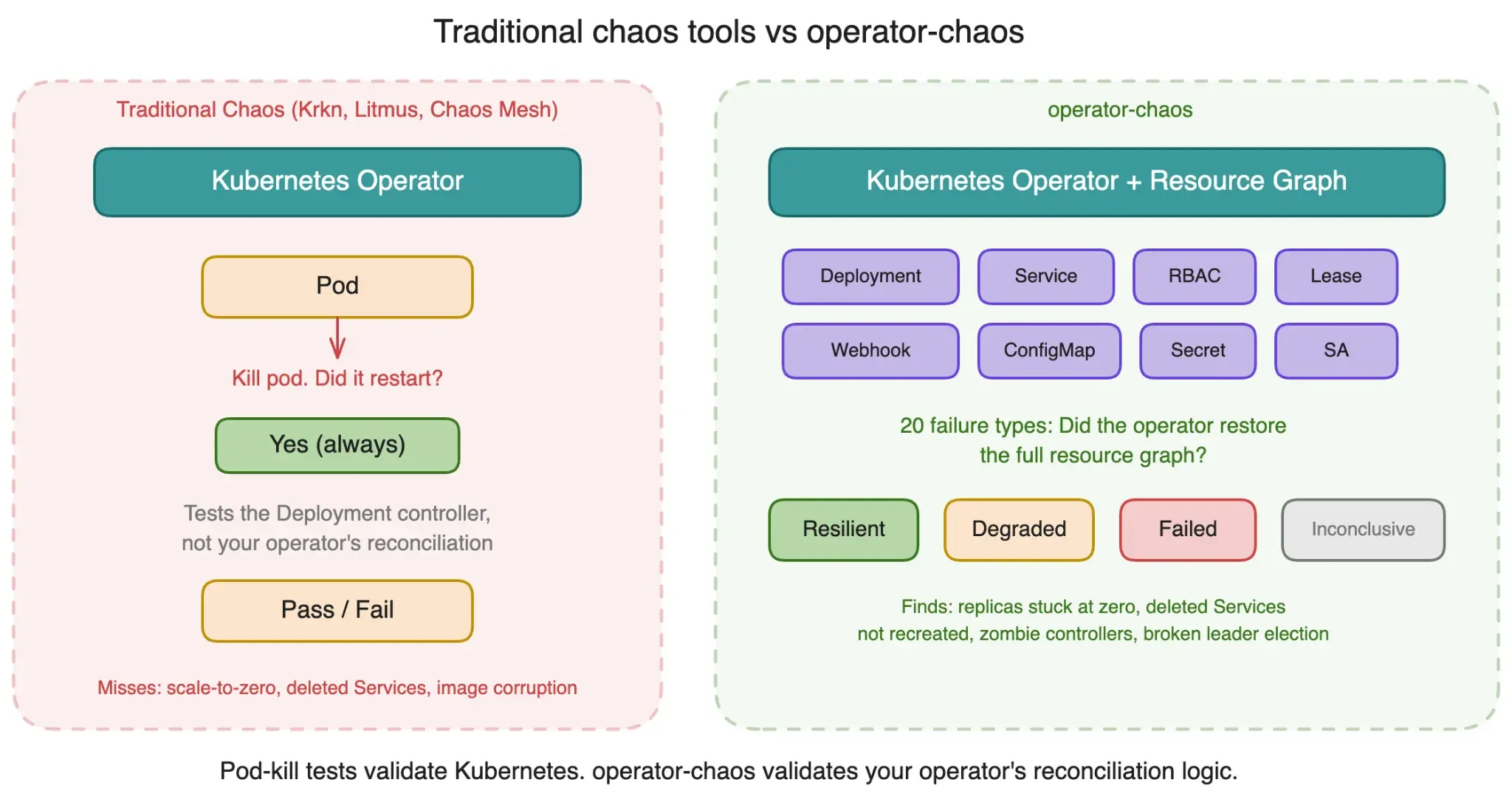
Kill a pod, and Kubernetes brings it back. That’s a Deployment controller test. But what happens when:
- Someone scales a Deployment to zero replicas. Does the operator notice and restore the replica count?
- A Service gets deleted. Does the operator recreate it with the correct selectors and ports?
- A ConfigMap drifts from its expected value. Does the operator detect and correct the configuration?
- An RBAC binding loses its subjects. Does the operator (or its parent operator) restore permissions?
- A container image gets corrupted to a nonexistent registry. Does the operator detect ImagePullBackOff and report a meaningful status?
- A Lease object gets deleted mid-reconciliation. Does the operator re-establish leader election?
These are the questions that matter for operators, and none of them are answered by kubectl delete pod.
Knowledge models
Before operator-chaos can test your operator, it needs to know what your operator manages. This is captured in a knowledge model: a YAML file describing the operator’s namespace, components, managed resources, and health criteria.
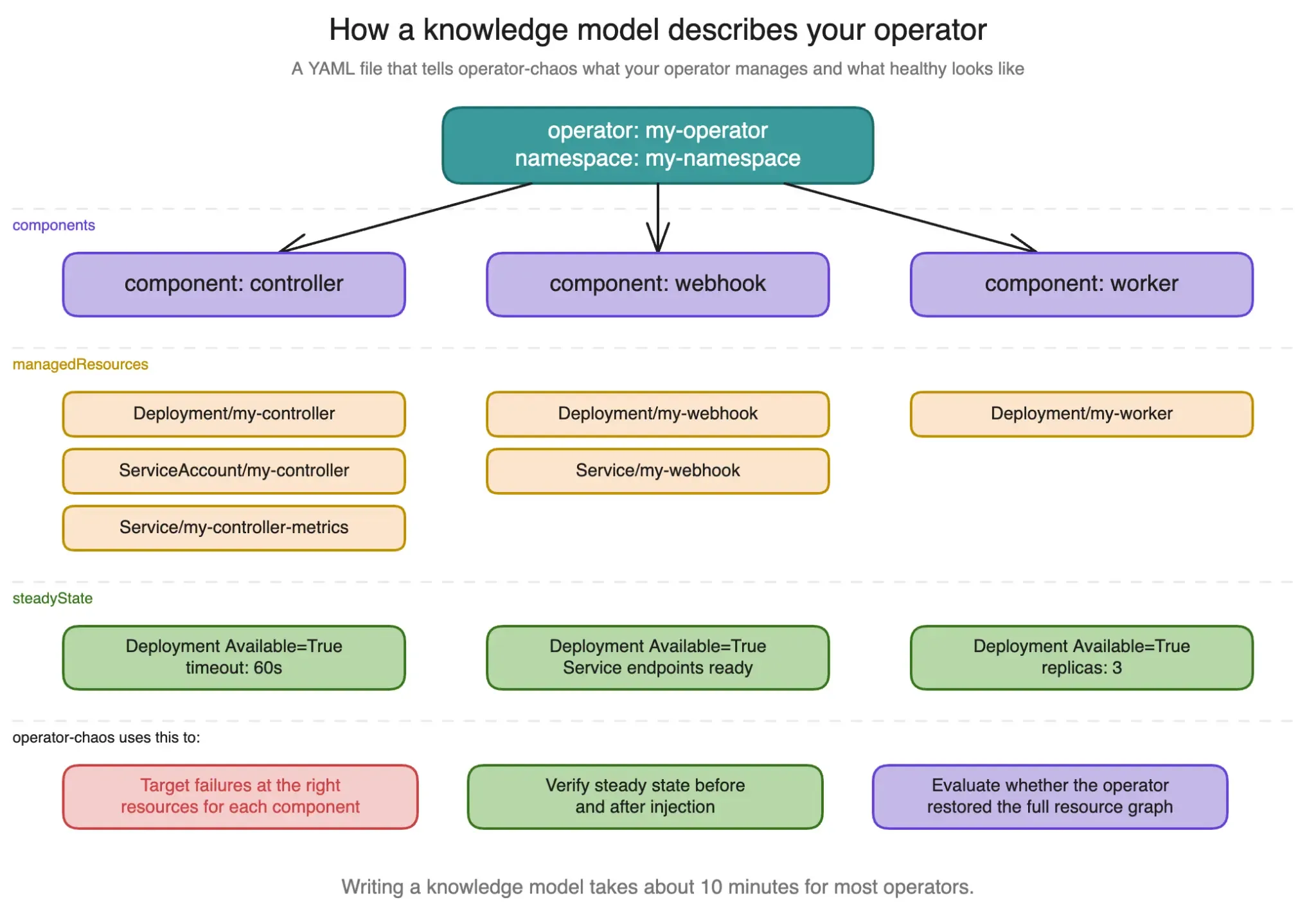
Here’s the cert-manager knowledge model. It declares three components (controller, webhook, cainjector), their managed resources, and how to verify each one is healthy:
operator:
  name: cert-manager
  namespace: cert-manager
  repository: https://github.com/cert-manager/cert-manager

components:
  - name: cert-manager-controller
    controller: cert-manager-operator
    managedResources:
      - apiVersion: apps/v1
        kind: Deployment
        name: cert-manager
        namespace: cert-manager
        labels:
          app.kubernetes.io/name: cert-manager
        expectedSpec:
          replicas: 1
      - apiVersion: v1
        kind: ServiceAccount
        name: cert-manager
        namespace: cert-manager
    steadyState:
      checks:
        - type: conditionTrue
          apiVersion: apps/v1
          kind: Deployment
          name: cert-manager
          namespace: cert-manager
          conditionType: Available
      timeout: "60s"

  - name: cert-manager-webhook
    controller: cert-manager-operator
    managedResources:
      - apiVersion: apps/v1
        kind: Deployment
        name: cert-manager-webhook
        namespace: cert-manager
        labels:
          app.kubernetes.io/name: webhook
        expectedSpec:
          replicas: 1
      - apiVersion: v1
        kind: ServiceAccount
        name: cert-manager-webhook
        namespace: cert-manager
    steadyState:
      checks:
        - type: conditionTrue
          apiVersion: apps/v1
          kind: Deployment
          name: cert-manager-webhook
          namespace: cert-manager
          conditionType: Available
      timeout: "60s"

  - name: cert-manager-cainjector
    controller: cert-manager-operator
    managedResources:
      - apiVersion: apps/v1
        kind: Deployment
        name: cert-manager-cainjector
        namespace: cert-manager
        labels:
          app.kubernetes.io/name: cainjector
        expectedSpec:
          replicas: 1
      - apiVersion: v1
        kind: ServiceAccount
        name: cert-manager-cainjector
        namespace: cert-manager
    steadyState:
      checks:
        - type: conditionTrue
          apiVersion: apps/v1
          kind: Deployment
          name: cert-manager-cainjector
          namespace: cert-manager
          conditionType: Available
      timeout: "60s"

recovery:
  reconcileTimeout: "300s"
  maxReconcileCycles: 10
The key design choice: knowledge models are declarative and separate from experiments. You write the model once, then run any combination of fault types against it. The framework knows which resources to check before and after injection because the model tells it.
Steady-state checks support two types: conditionTrue (verify a status condition like Available is True) and resourceExists (verify a resource exists in the cluster). The timeout field controls how long to wait for steady state before giving up.
The repo ships with 25 built-in knowledge models covering RHOAI/ODH components and common dependencies like cert-manager, Prometheus Operator, Knative, and Strimzi.
Twenty failure types across four categories
Operator-chaos ships 20 fault injection types organized into four categories, each with a danger level (low, medium, high) and a blast radius model:
Infrastructure faults
| Type | Danger | What it does |
|---|---|---|
| PodKill | Low | Force-deletes pods matching a label selector with zero grace period |
| DeploymentScaleZero | High | Scales a Deployment to zero replicas to test replica count reconciliation |
| CrashLoopInject | High | Patches a container command to a nonexistent binary, causing CrashLoopBackOff |
| ImageCorrupt | High | Patches a container image to an invalid registry, causing ImagePullBackOff |
| NamespaceDeletion | High | Deletes an entire namespace to test full resource graph recreation |
Configuration faults
| Type | Danger | What it does |
|---|---|---|
| ConfigDrift | Low | Modifies a key in a ConfigMap or Secret to test configuration reconciliation |
| CRDMutation | Medium | Mutates a spec field on a custom resource instance |
| LabelStomping | Medium | Modifies or removes labels on managed resources |
| OwnerRefOrphan | Medium | Removes ownerReferences to test re-adoption logic |
| ResourceDeletion | High | Deletes an arbitrary namespaced resource |
| SecretDeletion | High | Deletes a Secret to test detection and recreation |
Access control faults
| Type | Danger | What it does |
|---|---|---|
| RBACRevoke | High | Clears all subjects from a ClusterRoleBinding or RoleBinding |
| NetworkPartition | Medium | Creates a deny-all NetworkPolicy isolating pods |
| QuotaExhaustion | Medium | Creates a restrictive ResourceQuota |
Lifecycle faults
| Type | Danger | What it does |
|---|---|---|
| FinalizerBlock | Medium | Adds a stuck finalizer to block deletion |
| LeaderElectionDisrupt | High | Deletes a Lease object to force leader re-election |
| PDBBlock | High | Creates a PodDisruptionBudget with maxUnavailable=0 |
| WebhookDisrupt | High | Modifies failure policies on a ValidatingWebhookConfiguration |
| WebhookLatency | High | Deploys a slow admission webhook to add latency |
| ClientFault | Low | Injects errors, latency, or throttling into operator API calls via SDK |
Each experiment produces a structured verdict:
- Resilient: the operator fully restored all resources to their expected state within the recovery timeout
- Degraded: the operator partially recovered, some resources diverge from the expected state
- Failed: the operator did not recover within the timeout
- Inconclusive: pre-checks failed, so the test couldn’t establish a valid baseline
The verdict includes recovery time, number of reconcile cycles observed, and a list of specific deviations from the expected state. This is much more useful than a binary pass/fail because it tells you exactly what broke and how long recovery took.
The experiment lifecycle
Every experiment follows the same five-phase lifecycle, regardless of which injection mode you use.
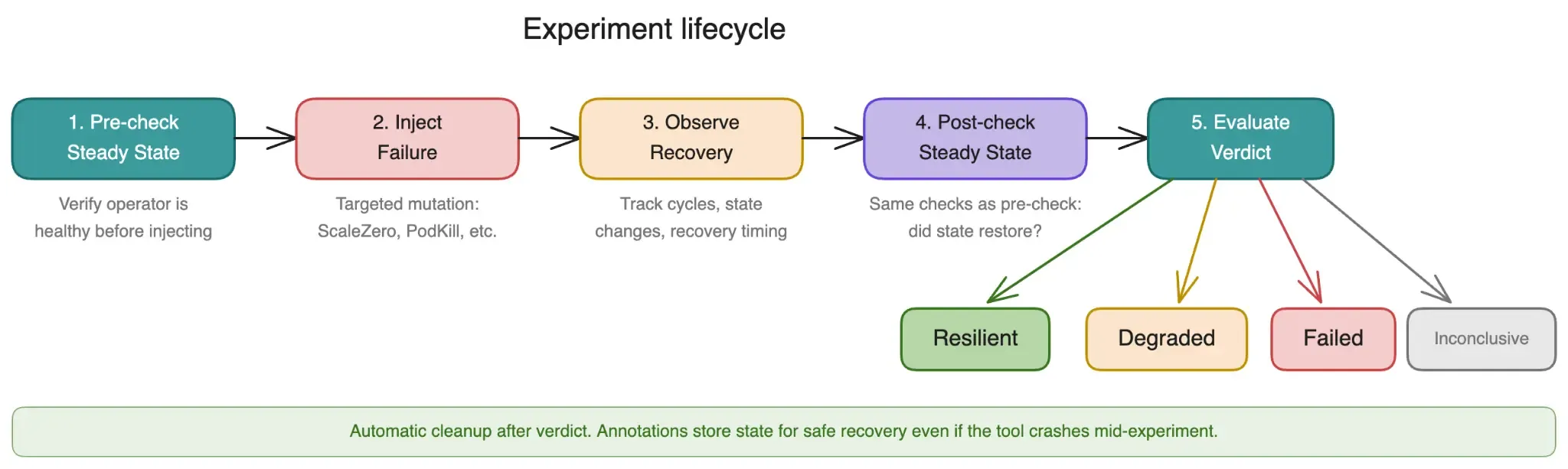
Phase 1: Pre-check. Verify steady state before injecting anything. If the operator isn’t healthy before the test, the result is Inconclusive. This catches flaky baselines early.
Phase 2: Injection. Apply the fault. Each fault type has its own injection logic: deleting resources, mutating specs, revoking RBAC, creating blocking policies, etc. The blast radius model constrains what gets affected.
Phase 3: Observation. Wait and watch. The framework polls the cluster for resource state changes, reconcile events, and status condition transitions. The reconcileTimeout from the knowledge model controls the maximum wait time.
Phase 4: Post-check. Run the same steady-state checks from phase 1 again. Compare the cluster state against the knowledge model’s expected state.
Phase 5: Verdict. Compare pre and post state. If everything matches, the verdict is Resilient. If some resources diverge, Degraded. If the operator didn’t recover at all, Failed.
Four injection modes
Operator-chaos provides four distinct ways to inject faults, each targeting a different layer of the operator’s execution. Pick the one that fits your testing scenario.
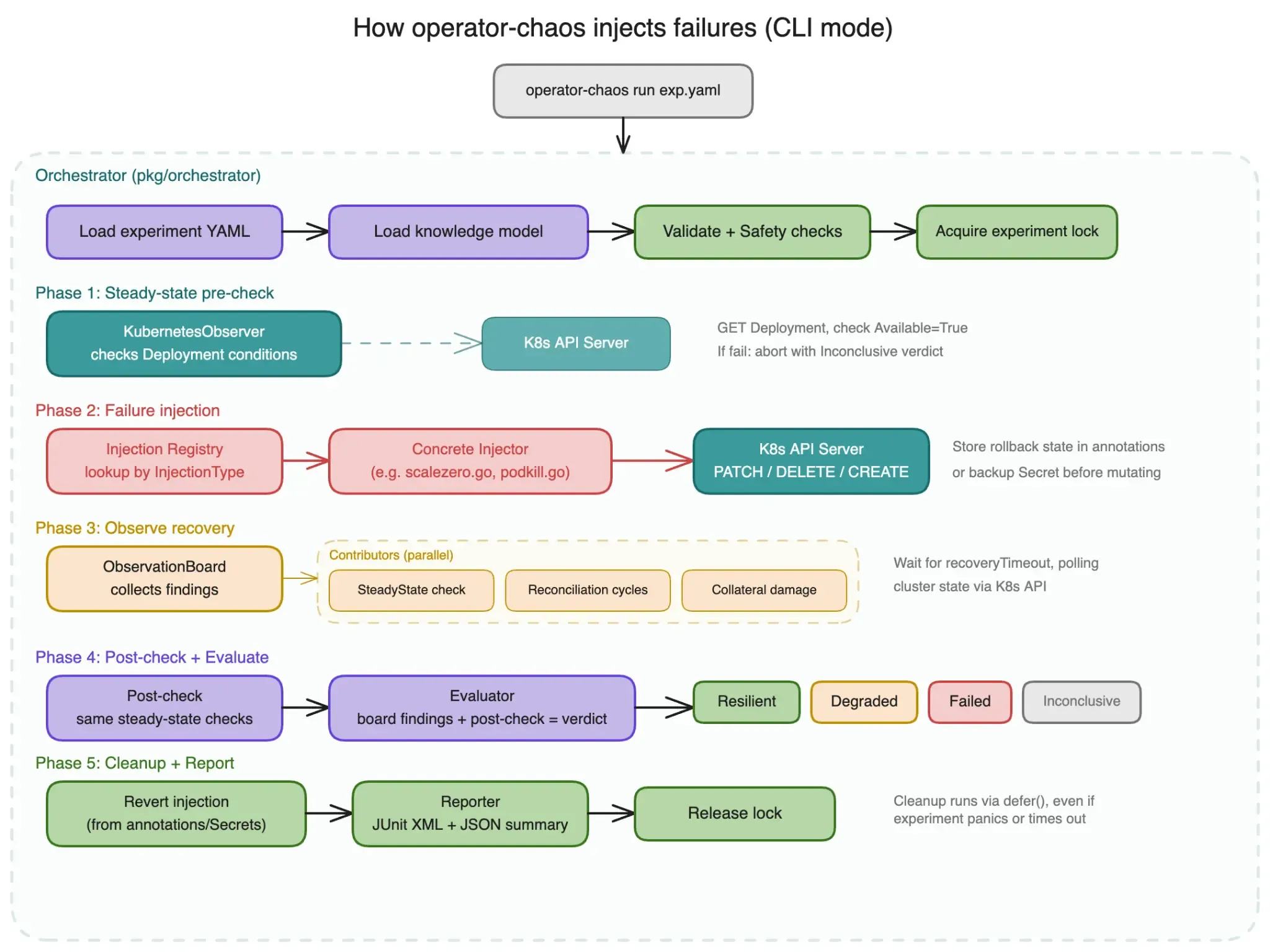
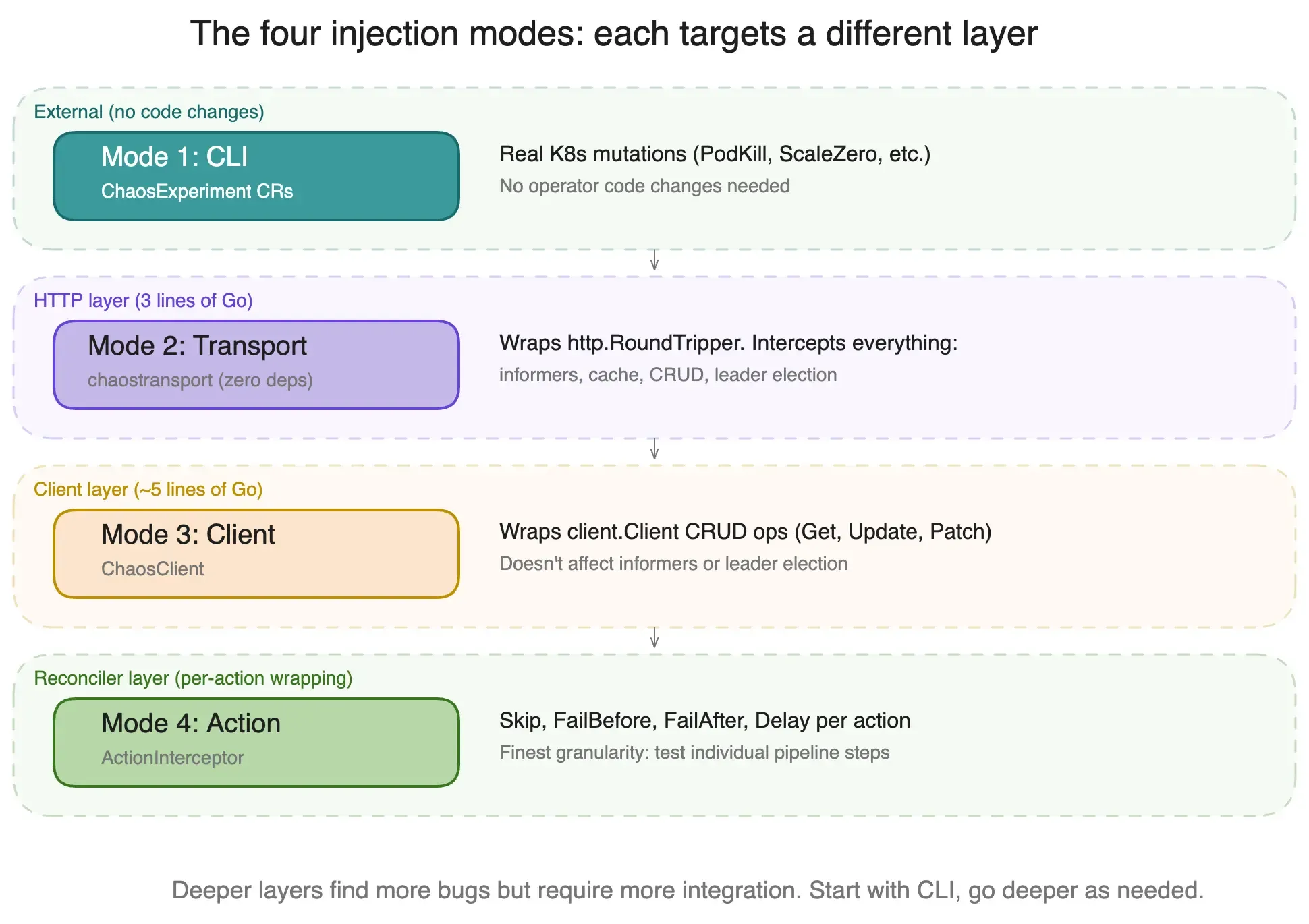
Mode 1: CLI (ChaosExperiment CRs)
External, black-box testing. Define experiments as YAML, run them with the CLI binary. Zero code changes to the operator under test.
apiVersion: chaos.operatorchaos.io/v1alpha1
kind: ChaosExperiment
metadata:
  name: omc-podkill
  labels:
    chaos.operatorchaos.io/component: odh-model-controller
    chaos.operatorchaos.io/suite: e2e
spec:
  target:
    operator: opendatahub-operator
    component: odh-model-controller
  injection:
    type: PodKill
    parameters:
      labelSelector: "control-plane=odh-model-controller"
    count: 1
    dangerLevel: low
  hypothesis:
    description: >
      Killing odh-model-controller pod should trigger Deployment
      restart; controller should be Available within 60s
    recoveryTimeout: "60s"
  steadyState:
    checks:
      - type: conditionTrue
        apiVersion: apps/v1
        kind: Deployment
        name: odh-model-controller
        namespace: opendatahub
        conditionType: Available
    timeout: "60s"
  blastRadius:
    maxPodsAffected: 1
    allowedNamespaces:
      - opendatahub
High-danger experiments (RBACRevoke, NamespaceDeletion, etc.) require an explicit allowDangerous: true in the blast radius to prevent accidental execution.
Mode 2: Transport-level (chaostransport)
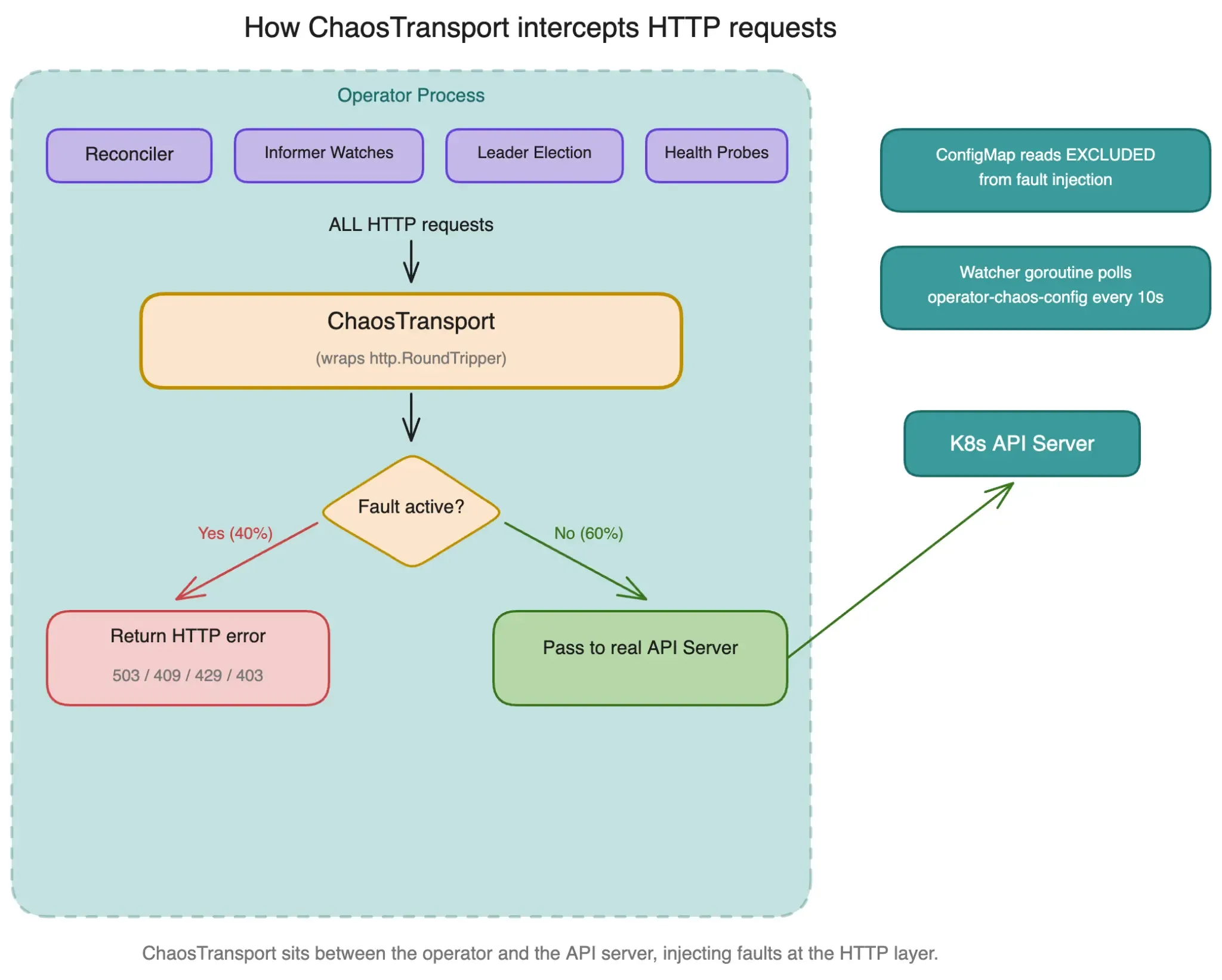
Wraps http.RoundTripper to intercept every HTTP request the operator makes to the API server. This is the most comprehensive injection point because it catches everything: informer LIST/WATCH, leader election, CRUD operations.
Integration is 3 lines in the operator’s main():
import "github.com/opendatahub-io/operator-chaos/pkg/chaostransport"

cfg := ctrl.GetConfigOrDie()

if os.Getenv("CHAOS_SDK_ENABLED") == "true" {
    ct := chaostransport.NewChaosTransport(chaostransport.NewFaultConfig(nil))
    cfg.WrapTransport = ct.WrapTransport
}

mgr, err := ctrl.NewManager(cfg, ctrl.Options{...})
When a fault fires, it returns a semantically correct HTTP error without the request ever reaching the API server:
| Operation | HTTP Status | Simulates |
|---|---|---|
| GET / LIST | 503 Service Unavailable | API server unavailability |
| POST (Create) | 429 Too Many Requests | Rate limiting |
| PUT / PATCH (Update) | 409 Conflict | Write conflicts |
| DELETE | 403 Forbidden | Permission errors |
Mode 3: Client-level (ChaosClient)
Wraps client.Client from controller-runtime. Operates at the CRUD level rather than HTTP. Good for integration tests where you want to inject faults on specific operations:
faults := sdk.NewFaultConfig(map[sdk.Operation]sdk.FaultSpec{
    sdk.OpGet: {
        ErrorRate: 0.3,
        Error:     "connection refused",
    },
    sdk.OpList: {
        MaxDelay: 2 * time.Second,
    },
    sdk.OpUpdate: {
        ErrorRate: 0.5,
        Error:     "the object has been modified; please apply your changes to the latest version",
        Delay:     500 * time.Millisecond,
    },
})

chaosClient := sdk.NewChaosClient(realClient, faults)
r := &MyReconciler{client: chaosClient}
Nine supported operations: OpGet, OpList, OpCreate, OpUpdate, OpDelete, OpPatch, OpDeleteAllOf, OpReconcile, OpApply.
Mode 4: Action Pipeline (ActionInterceptor)
For operators that use a reconciler pipeline pattern (like the opendatahub-operator’s action chains), you can inject faults at the individual action level:
interceptor := chaostransport.NewActionInterceptor(
    map[string]chaostransport.ActionFaultConfig{
        "deploy": {
            FailBefore: "simulated deploy failure",
            ErrorRate:  0.5,
        },
        "gc": {
            Skip: true,
        },
    },
)
deployAction = interceptor.Wrap("deploy", deployAction)
Four fault behaviors: Skip (action becomes a no-op), FailBefore (return error before action runs), FailAfter (run action then return error), Delay (add latency before the action).
Mode comparison
| Aspect | Transport (chaostransport) | SDK (ChaosClient) | CLI (ChaosExperiment) |
|---|---|---|---|
| Intercepts informers | Yes | No | N/A (external) |
| Intercepts CRUD | Yes | Yes | N/A (external) |
| Intercepts leader election | Yes | No | N/A (external) |
| Dependencies | Zero | controller-runtime | None (binary) |
| Code changes | 3 lines | ~5 lines | None |
| Requires cluster | Yes (or fake) | Yes (or fake) | Yes |
The chaostransport zero-dependency module
This was one of the trickiest design decisions. The main operator-chaos SDK imports controller-runtime v0.19.7+ and k8s.io/client-go v0.35.x. When I tried integrating it with real operators, 4 out of 7 had dependency conflicts because they were pinned to different controller-runtime versions.
The solution: chaostransport is a separate Go module with zero external dependencies.
module github.com/opendatahub-io/operator-chaos/pkg/chaostransport

go 1.22.0
That’s the entire go.mod. No controller-runtime. No k8s.io. Only the Go standard library. Any operator can import it regardless of their k8s.io version pins.
It works because the transport layer is pure HTTP. The WrapTransport field on rest.Config accepts any function that wraps http.RoundTripper, which is a standard library interface. No Kubernetes types needed.
If even the sub-module import causes problems (I’ve seen this with very old operator codebases), there’s a third option: the transport wrapper is about 250 lines of Go. You can copy it into your source tree as a vendored file and maintain it yourself.
| Approach | Dependency impact | What you get |
|---|---|---|
| chaostransport sub-module | Zero k8s.io deps | Transport wrapper, ActionInterceptor, fault config types, ConfigMap parser |
| pkg/sdk/client (ChaosClient) | Requires controller-runtime v0.19.7+ | client.Client wrapper for CRUD-level injection |
| Inline (~250 lines) | Zero external deps | Copy transport wrapper into your source tree |
ConfigMap-driven runtime control
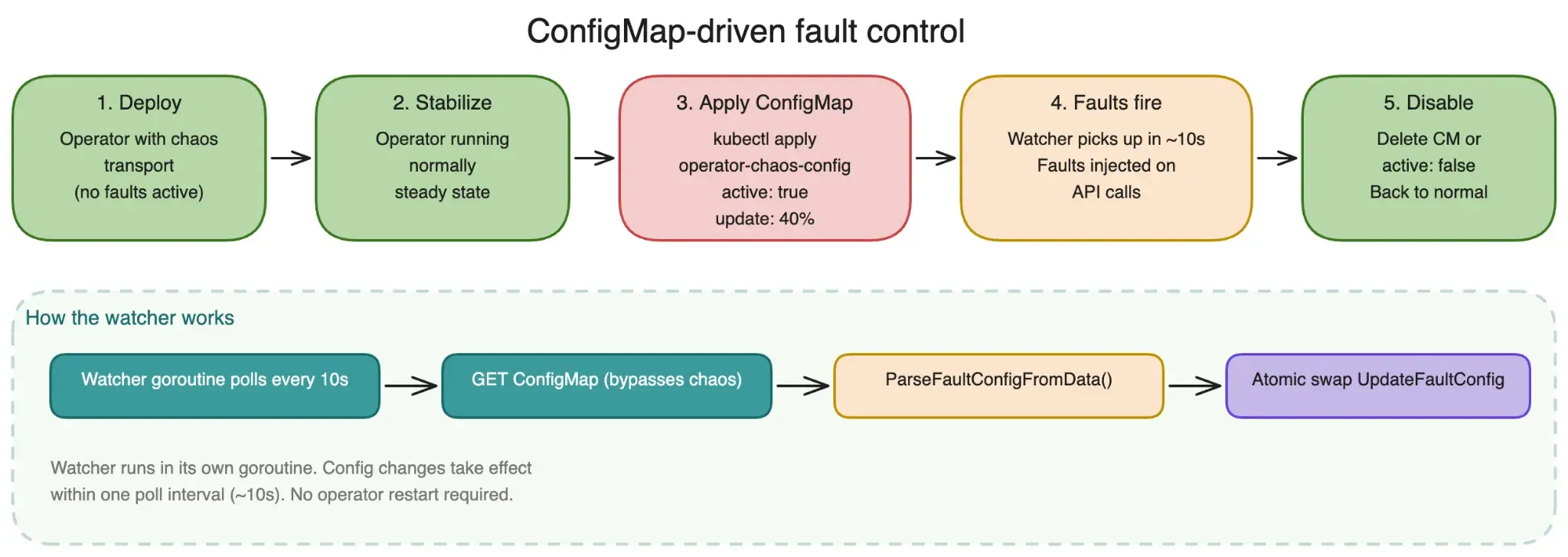
In production-like environments, you don’t want to redeploy the operator to change fault configuration. The chaostransport module watches a ConfigMap for dynamic fault control.
apiVersion: v1
kind: ConfigMap
metadata:
  name: operator-chaos-config
  namespace: my-namespace
data:
  config: |
    {
      "active": true,
      "faults": {
        "update": {"errorRate": 0.4, "error": "chaos conflict"},
        "patch":  {"errorRate": 0.4, "error": "chaos SSA conflict"},
        "create": {"errorRate": 0.2, "error": "chaos already exists"}
      }
    }
The watcher picks up changes within 10 seconds. To disable all faults, either delete the ConfigMap or set "active": false. This lets you run chaos experiments on a staging cluster without any operator restarts: just kubectl apply the ConfigMap, observe the operator’s behavior, then delete it.
One important detail: the transport layer always passes through requests for its own ConfigMap. Otherwise you’d create a deadlock where the chaos watcher can’t reach the API server to read its own config.
Live demo: cert-manager passing 18/18
Here’s what a full chaos suite run looks like against cert-manager on a kind cluster. This uses the CLI mode with the cert-manager knowledge model and 18 experiments covering all four fault categories:
$ operator-chaos suite experiments/cert-manager/ \
    --knowledge knowledge/cert-manager.yaml \
    --report-dir results/cert-manager/

[PRE-CHECK] Verifying steady state for cert-manager...
  ✓ cert-manager-controller: Deployment Available
  ✓ cert-manager-webhook: Deployment Available
  ✓ cert-manager-cainjector: Deployment Available

[SUITE] Running 18 experiments against cert-manager

 1/18 PodKill (cert-manager-controller)
      Injecting: force-delete pods with label app.kubernetes.io/name=cert-manager
      Observing recovery... recovered in 8.2s
      Post-check: Deployment Available ✓
      Verdict: RESILIENT (8.2s, 2 reconcile cycles)

 2/18 PodKill (cert-manager-webhook)
      Injecting: force-delete pods with label app.kubernetes.io/name=webhook
      Observing recovery... recovered in 6.1s
      Post-check: Deployment Available ✓
      Verdict: RESILIENT (6.1s, 1 reconcile cycles)

 3/18 PodKill (cert-manager-cainjector)
      Injecting: force-delete pods with label app.kubernetes.io/name=cainjector
      Observing recovery... recovered in 7.4s
      Post-check: Deployment Available ✓
      Verdict: RESILIENT (7.4s, 2 reconcile cycles)

 4/18 DeploymentScaleZero (cert-manager-controller)
      Injecting: scale cert-manager to 0 replicas
      Observing recovery... recovered in 12.3s
      Post-check: replicas=1, Deployment Available ✓
      Verdict: RESILIENT (12.3s, 3 reconcile cycles)

 5/18 DeploymentScaleZero (cert-manager-webhook)
      Injecting: scale cert-manager-webhook to 0 replicas
      Observing recovery... recovered in 11.8s
      Post-check: replicas=1, Deployment Available ✓
      Verdict: RESILIENT (11.8s, 3 reconcile cycles)

 6/18 DeploymentScaleZero (cert-manager-cainjector)
      Injecting: scale cert-manager-cainjector to 0 replicas
      Observing recovery... recovered in 10.5s
      Post-check: replicas=1, Deployment Available ✓
      Verdict: RESILIENT (10.5s, 2 reconcile cycles)

 7/18 ConfigDrift (cert-manager-controller)
      Injecting: mutate ConfigMap cert-manager-config key=leaderElect
      Observing recovery... recovered in 4.1s
      Post-check: ConfigMap restored ✓
      Verdict: RESILIENT (4.1s, 1 reconcile cycles)

 8/18 ResourceDeletion (ServiceAccount/cert-manager)
      Injecting: delete ServiceAccount cert-manager
      Observing recovery... recovered in 5.7s
      Post-check: ServiceAccount exists ✓
      Verdict: RESILIENT (5.7s, 2 reconcile cycles)

 9/18 ResourceDeletion (ServiceAccount/cert-manager-webhook)
      Injecting: delete ServiceAccount cert-manager-webhook
      Observing recovery... recovered in 5.2s
      Post-check: ServiceAccount exists ✓
      Verdict: RESILIENT (5.2s, 1 reconcile cycles)

10/18 ResourceDeletion (ServiceAccount/cert-manager-cainjector)
      Injecting: delete ServiceAccount cert-manager-cainjector
      Observing recovery... recovered in 5.9s
      Post-check: ServiceAccount exists ✓
      Verdict: RESILIENT (5.9s, 2 reconcile cycles)

11/18 LabelStomping (cert-manager-controller)
      Injecting: remove label app.kubernetes.io/name from Deployment
      Observing recovery... recovered in 3.8s
      Post-check: labels restored ✓
      Verdict: RESILIENT (3.8s, 1 reconcile cycles)

12/18 ImageCorrupt (cert-manager-controller)
      Injecting: patch image to invalid.registry.io/does-not-exist:v0.0.0
      Observing recovery... recovered in 18.7s
      Post-check: Deployment Available ✓
      Verdict: RESILIENT (18.7s, 4 reconcile cycles)

13/18 CrashLoopInject (cert-manager-controller)
      Injecting: patch command to /nonexistent-binary
      Observing recovery... recovered in 22.1s
      Post-check: Deployment Available ✓
      Verdict: RESILIENT (22.1s, 5 reconcile cycles)

14/18 FinalizerBlock (cert-manager-controller)
      Injecting: add stuck finalizer chaos.test/block to Deployment
      Observing cleanup handling... handled in 8.3s
      Post-check: finalizer removed ✓
      Verdict: RESILIENT (8.3s, 2 reconcile cycles)

15/18 LeaderElectionDisrupt (cert-manager-controller)
      Injecting: delete Lease cert-manager-controller
      Observing recovery... re-elected in 15.2s
      Post-check: Lease exists, holder identity set ✓
      Verdict: RESILIENT (15.2s, 1 reconcile cycles)

16/18 OwnerRefOrphan (ServiceAccount/cert-manager)
      Injecting: remove ownerReferences from ServiceAccount
      Observing recovery... re-adopted in 6.4s
      Post-check: ownerReferences restored ✓
      Verdict: RESILIENT (6.4s, 2 reconcile cycles)

17/18 NetworkPartition (cert-manager-controller)
      Injecting: deny-all NetworkPolicy for cert-manager pods
      Observing recovery... TTL expired, policy removed in 32.1s
      Post-check: Deployment Available ✓
      Verdict: RESILIENT (32.1s, 3 reconcile cycles)

18/18 QuotaExhaustion (cert-manager namespace)
      Injecting: restrictive ResourceQuota (cpu: 10m, memory: 16Mi)
      Observing behavior... quota removed after observation
      Post-check: Deployment Available ✓
      Verdict: RESILIENT (14.6s, 2 reconcile cycles)

[SUMMARY] cert-manager chaos suite: 18/18 RESILIENT

  Category         Tests  Resilient  Degraded  Failed
  Infrastructure       6         6         0       0
  Configuration        5         5         0       0
  Access Control       2         2         0       0
  Lifecycle            5         5         0       0

  Avg recovery time: 10.9s
  Max recovery time: 32.1s (NetworkPartition)
  Total reconcile cycles: 39

Report written to results/cert-manager/report.json
18/18 resilient. That’s what well-designed operator reconciliation looks like. The average recovery time of 10.9s tells you the operator is responsive, and the reconcile cycle counts tell you how many loops it took to converge.
Compare this to what you’d learn from running kubectl delete pod three times: “pods came back.” That’s true but useless for understanding reconciliation quality.
Fuzz testing harness
For the fastest feedback loop, operator-chaos includes a fuzz testing harness that runs entirely in-process using a fake client. No cluster required. It integrates with Go’s native testing.F so you get the full benefit of the Go fuzz engine: corpus management, coverage-guided mutation, and crash reproduction.
package mycontroller_test

import (
    "testing"

    corev1 "k8s.io/api/core/v1"
    metav1 "k8s.io/apimachinery/pkg/apis/meta/v1"
    "k8s.io/apimachinery/pkg/runtime"
    "k8s.io/apimachinery/pkg/types"
    "sigs.k8s.io/controller-runtime/pkg/reconcile"

    "github.com/opendatahub-io/operator-chaos/pkg/sdk/fuzz"
)

func FuzzMyReconciler(f *testing.F) {
    // Seed corpus: starting values for the fuzz engine to mutate
    f.Add(uint16(0x01FF), uint8(0), uint16(32768))  // all ops, conflict error, 50%
    f.Add(uint16(0x0001), uint8(1), uint16(65535))   // Get only, not found, 100%
    f.Add(uint16(0), uint8(0), uint16(0))            // no faults (baseline)

    scheme := runtime.NewScheme()
    _ = corev1.AddToScheme(scheme)

    f.Fuzz(func(t *testing.T, opMask uint16, faultType uint8, intensity uint16) {
        cm := &corev1.ConfigMap{
            ObjectMeta: metav1.ObjectMeta{
                Name:      "my-config",
                Namespace: "default",
            },
            Data: map[string]string{"key": "value"},
        }

        req := reconcile.Request{
            NamespacedName: types.NamespacedName{
                Name:      "my-config",
                Namespace: "default",
            },
        }

        h := fuzz.NewHarness(myFactory, scheme, req, cm)

        h.AddInvariant(fuzz.ObjectExists(
            types.NamespacedName{Name: "my-config", Namespace: "default"},
            &corev1.ConfigMap{},
        ))

        fc := fuzz.DecodeFaultConfig(opMask, faultType, intensity)
        if err := h.Run(t, fc); err != nil {
            t.Fatal(err)
        }
    })
}
The DecodeFaultConfig function maps three integers into a complete fault configuration:
opMaskis a bitmask. Bit 0 = Get, bit 1 = List, through bit 8 = Apply.0x01FFenables faults on all 9 operations.faultTypeindexes 11 Kubernetes error types (0=conflict, 1=not found, 2=deadline exceeded, etc.), wrapping modulo 11.intensitymaps linearly to error rate: 0 = never fire, 65535 = always fire, 32768 = roughly 50%.
The fuzz engine mutates these three values, exploring the space of possible fault combinations. When it finds a combination that crashes your reconciler or violates an invariant, it saves the failing input to your corpus for deterministic reproduction.
Built-in invariants include ObjectExists (verify a resource still exists after reconciliation) and ObjectCount (verify the expected number of resources). You can also write custom invariant functions.
Performance is roughly 800 runs per second. Everything runs in-process with a fake client, so there’s no network overhead. This makes it practical to run as part of make test in CI.
You can also auto-generate fuzz targets from knowledge models:
operator-chaos generate fuzz-targets \
    --knowledge knowledge/kserve.yaml \
    --output fuzz_kserve_test.go
Getting started in 5 minutes
Here’s how to go from zero to running your first chaos experiment.
Step 1: Install
go install github.com/opendatahub-io/operator-chaos/cmd/operator-chaos@latestSingle static binary, about 20MB.
Step 2: Create a knowledge model
Write a YAML file describing your operator. Start with the operator name, namespace, and one component:
operator:
  name: my-operator
  namespace: my-operator-system

components:
  - name: my-controller
    controller: my-operator
    managedResources:
      - apiVersion: apps/v1
        kind: Deployment
        name: my-controller
        namespace: my-operator-system
        expectedSpec:
          replicas: 1
    steadyState:
      checks:
        - type: conditionTrue
          apiVersion: apps/v1
          kind: Deployment
          name: my-controller
          namespace: my-operator-system
          conditionType: Available
      timeout: "60s"

recovery:
  reconcileTimeout: "300s"
  maxReconcileCycles: 10
Step 3: Generate an experiment
operator-chaos init \
    --component my-controller \
    --operator my-operator \
    --type PodKill > experiment.yaml
Step 4: Validate
operator-chaos validate knowledge.yaml --knowledge
operator-chaos validate experiment.yaml
Step 5: Dry run
operator-chaos run experiment.yaml \
    --knowledge knowledge.yaml \
    --dry-run
This shows you exactly what would happen without touching the cluster.
Step 6: Run for real
operator-chaos run experiment.yaml \
    --knowledge knowledge.yaml
Once you’re comfortable with individual experiments, run a full suite:
operator-chaos suite experiments/ \
    --knowledge knowledge.yaml \
    --report-dir results/
The CLI also supports built-in profiles for common operators:
operator-chaos generate experiments --profile cert-manager -o experiments/
operator-chaos generate experiments --profile rhoai -o experiments/
operator-chaos generate experiments --profile odh -o experiments/
Tips and best practices
Start with low-danger experiments. PodKill and ConfigDrift are good first tests. They’re easy to reason about and the blast radius is small. Work your way up to RBACRevoke and NamespaceDeletion once you understand how your operator responds to simpler faults.
Use profiles for coverage. The built-in profiles generate a complete experiment suite for your operator. Running operator-chaos generate experiments --profile rhoai produces experiments for all 16 RHOAI components. This is much more thorough than writing experiments by hand.
Run fuzz tests in CI. The fuzz harness requires no cluster and runs at 800 iterations per second. Add go test -fuzz=Fuzz -fuzztime=30s to your CI pipeline. Thirty seconds of fuzzing catches a surprising number of reconciler bugs that unit tests miss: unhandled conflict errors, nil pointer dereferences on not-found, and infinite retry loops.
Gate chaostransport behind an environment variable. Never enable it by default. The CHAOS_SDK_ENABLED pattern ensures the transport wrapper is completely inert in production. The ConfigMap watcher only starts when the env var is set.
Test on kind first. kind clusters are fast to create, disposable, and free. The cert-manager suite above runs in about 3 minutes on a kind cluster. Once you’re confident in the results, run the same suite on a staging OpenShift cluster for higher fidelity.
Read the verdicts, not just the pass count. A Degraded verdict is more interesting than a Failed one. It means the operator partially recovered, and the deviation list tells you exactly which resource diverged. This is often a missing Watches() or Owns() registration, which is easy to fix once you know about it.
What’s next
This post covered the “what” and “how” of operator-chaos. Part 2 will go deeper into the results from testing RHOAI’s 16 component controllers, including which fault types exposed real reconciliation gaps and how we fixed them.
Other posts in this series:
- Protect your Kubernetes Operator from OOMKill
- 5 anti-patterns that cause Kubernetes operator vulnerabilities
- Why your RBAC linter misses privilege escalation chains
Also published on Red Hat Developer:
- Protect your Kubernetes Operator from OOMKill
- 5 anti-patterns that cause Kubernetes operator vulnerabilities
The full source, documentation, and 25 built-in knowledge models are at github.com/opendatahub-io/operator-chaos. The docs site with API reference and integration guides is at opendatahub-io.github.io/operator-chaos.
If you maintain a controller-runtime operator, try running the cert-manager suite on a kind cluster. It takes 5 minutes and it will change how you think about reconciliation testing.